


VS2Pro is a pre-processing, post-processing, and design software program developed by Vanguard Structural Solutions LLC. VS2Pro aims to facilitate analysis and design processes of structures and mechanical components with a specific focus on nuclear power plants (NPPs) and small modular reactors (SMRs). Supporting both scripting and GUI inputs, VS2Pro is designed to be fully compatible and work in conjunction with commercial general finite element analysis (FEA) software products.
This page highlights some of the features available in VS2Pro, which are presented in four categories:
-
Pre-Processing
-
Post-Processing
-
Design
-
Seismic
(This page is updated periodically.)


Pre-Processing
Geometry and Mesh Generation
VS2Pro enables users to rapidly generate and assemble geometries and meshes using user-defined CSV files containing components’ shapes, dimensions, mesh sizes, local coordinate systems, as well as plot preferences. Its built-in functions allow for creating mesh transition regions at interfaces. Shell and solid mesh features are designed to provide users with maximum control over element coordinate system and node numbering often necessary for modeling and post-processing of element results. Additionally, VS2Pro’s Import External Mesh allows users to import external node and element data files. Below are a few examples of geometries and meshes created in VS2Pro. Generated meshes’ node and element data can be exported as CSV files.
Post-Processing
Section Resultant Calculator feature enables users to compute forces and moments across sections of 1D, 2D, and 3D elements (i.e., beam, shell, solid, and solid-shell) at arbitrary points, lines, and planar or non-planar surfaces. Once a user defines a section cut plane or non-planar surface, the program automatically identifies the intersected elements, calculates individual elements’ force and moment contributions by interpolating element results (for 1D elements), integrating linear forces and moments for shell elements, and integrating stresses in solid elements. Subsequently, the program determines the location of the intersected area’s centroid, calculates the total forces and moments at the interface, and reports the results in the global and the user-defined local coordinate systems.
In the example below, a cylindrical structure is subjected to unit loads in three directions. The structure’s free mesh does not allow for calculation of the nodal forces and moments at the shown plane. First, model geometry and general data are imported. VS2Pro calculates element coordinate systems via elements’ node numbering. User-defined element coordinate systems can be used to override the calculated ESYS’s. Calculated or Imported data can be examined. Next, element forces and moments are imported. Plotting options are available for verification of the imported data. Subsequently, the intersection line at the user-defined plane is calculated, along with the total forces and moment acting on the interface.
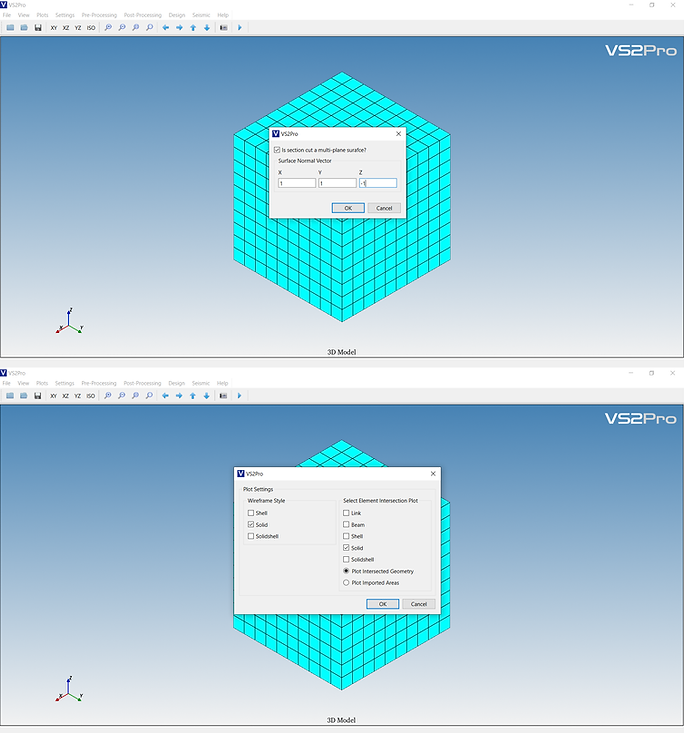
In the second example, section resultant forces and moments are calculated on a plane and a non-planar surface defined at intersection of the solid model and the imported plane and surface.




Design
VS2Pro Design features enable users to calculate section capacities and demand/capacity ratios (DCR) for reinforced concrete sections. Three methods are available:
-
Element-based method: results are evaluated for each element.
-
Section-based method with user-defined sections: results are evaluated for each user-defined section.
-
Section-based method with SWEEP feature: a design region is defined and evaluated per user-defined minimum and maximum section cut lengths. This feature aims to eliminate probability of under-design caused by performing DCR check at a limited number of locations, while avoiding over-design issues common to element-based approach.
Following example shows the elements at the base of a reinforced concrete wall section subjected to in-plane shear and out-of-plane bending moment. SWEEP design feature is set to a length of 3ft. VS2Pro evaluates section capacity for each contiguous three-element group (18 groups in total). For each group, element forces and moments are integrated and total forces and moments acting on the section are calculated and compared with the section capacity. Results show that the maximum DCR occurs at group 16, where neither axial force nor out-of-plane bending moment of the individual elements is the highest. In this case, a section-based design relying on sections defined based on maximum (or minimum) axial force or out-of-plane bending moment of the individual elements would lead to an under-design of approximately 10%.
Seismic
VS2Pro Seismic features enable users to examine seismic data and perform analysis in time-domain and frequency-domain. These features include:
-
Baseline correction can be performed via polynomial fitting with constant, linear, quadratic, and cubic options.
-
Data filtering is available via a bandpass Butterworth filter.
-
Fourier amplitude plots can be generated to evaluate the input data in frequency-domain.
-
Frequency Domain Analysis feature enables users to calculate structural response of a system in frequency-domain and time-domain for given input motions and transfer functions (frequency response functions). Vs2Pro calculates the structural response by performing convolution of input motion time history and the transfer function.
-
Response Spectra feature enables users to solve the equation of motion using Newmark method for a given base acceleration time history, and calculate spectral acceleration for a SDOF system for variable damping levels.
-
Component ISRS feature allows users to combine, peak-broaden, and envelope in-structure response spectra for a component per ISRS data at different locations.
In the example below, polynomial fitting with cubic option is used to remove the low-frequency data from an acceleration time history.
Following example shows calculation of the structural response of a mass-spring-damper system with natural frequency of 5 Hz. Frequency domain analysis is performed to first calculate the structural response in frequency-domain, and subsequently in time-domain. Response Spectra feature is used to compute the 4% damped SDOF response. Ultimately, a 15% peak-broadened response is calculated.

